
Google Ads Audit
Stop Wasting Time. Find Your Wasted Ad Spend.
Our Google Ads Audit Tool runs 60+ daily checks to give you actionable insights, not just data.
PPC Rocket delivers the clarity you need to optimize your campaigns and boost ROI. Get automated, daily audits covering account structure, keyword performance, landing page issues, and hidden cost drivers. Connect your account in 5 minutes and see exactly where your budget is leaking.
Budget Efficiency & ROI
Uncover Hidden & Wasted Spend
Instantly identify keywords, search term patterns (N-Grams), and landing pages that consume your budget without delivering conversions. Our tool flags long-term non-converting keywords that standard analysis often misses, allowing you to reallocate spend to high-performing areas.
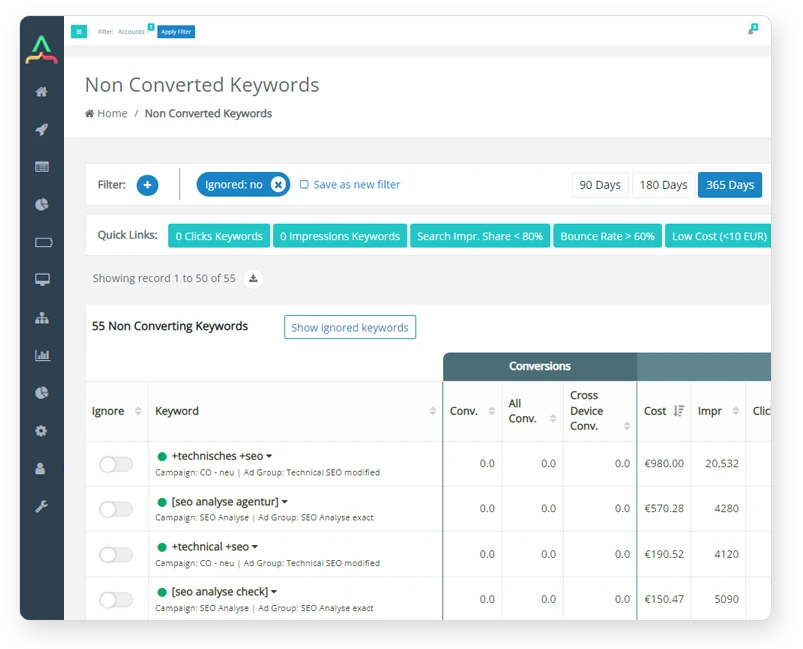
- Non-Converting Keywords: Pinpoint keywords with zero conversions over 90, 180, or 365 days.
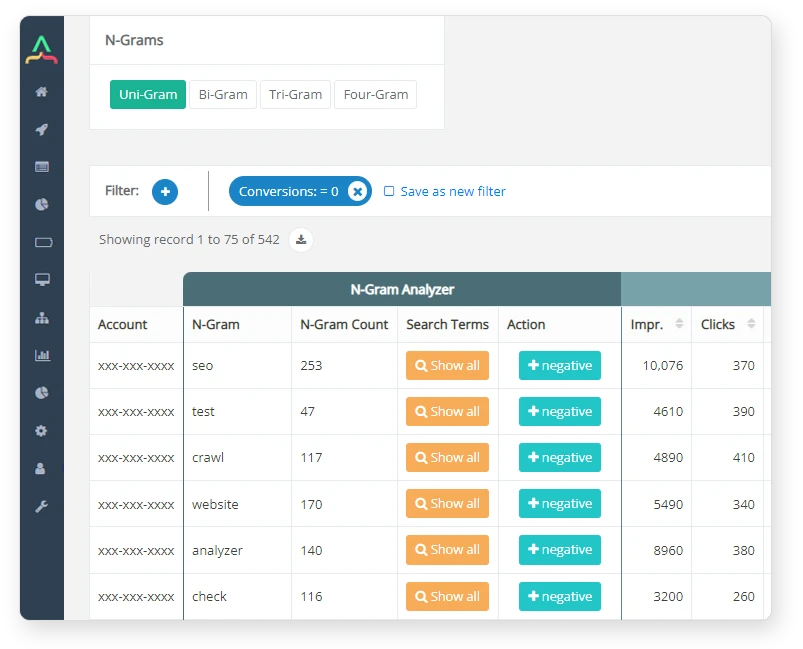
- N-Gram Analysis: Isolate costly, non-converting word patterns across all search terms.
- Impression Share: Diagnose if you’re losing visibility due to budget caps on your best campaigns.
- Cost Savings: Calculate the direct financial impact of optimizing your account based on our findings.




Performance & Targeting
Diagnose and Fix Underperformance
Go beyond surface-level metrics. Our audits analyze Quality Score trends, ad rank limitations, and duplicate search terms to reveal the root causes of inefficiency. Get actionable recommendations to improve ad relevance, lower CPCs, and ensure the right ad shows for the right query.
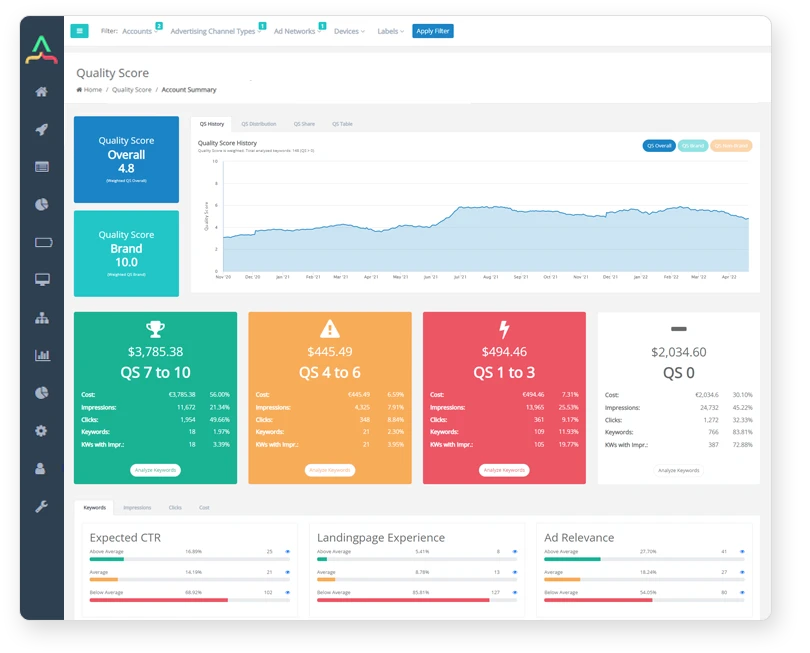
- Quality Score: Track impression-weighted QS trends and pinpoint your weakest component—CTR, ad relevance, or landing page experience.
- Lost Ad Rank: Identify where strong competitors are outranking you, even with a sufficient budget.
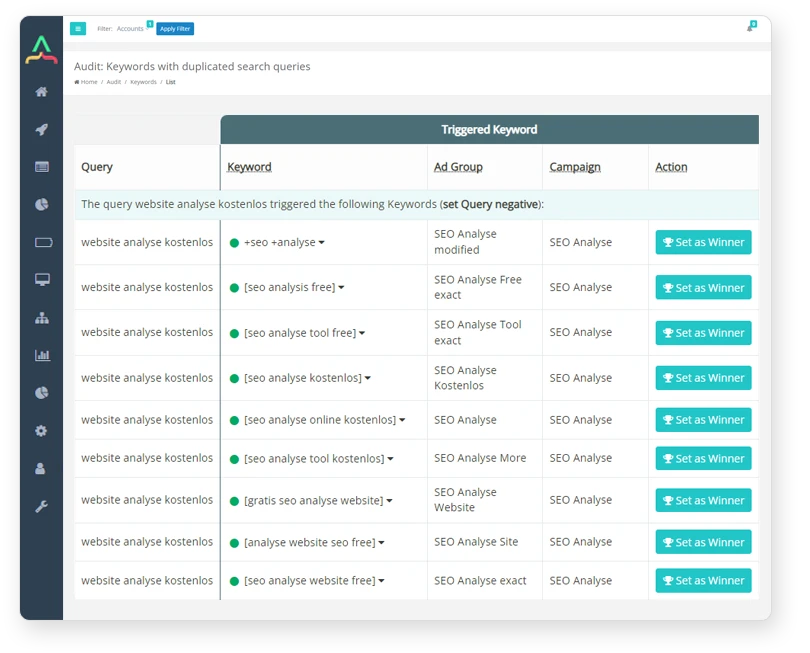
- Duplicate Search Terms: Find where the same query triggers ads in multiple ad groups, causing internal competition.
- Performance Max: Check how much of your PMax traffic is branded vs. actual prospecting.
Landing Page Optimization
Stop Sending Traffic to Broken or Underperforming Pages
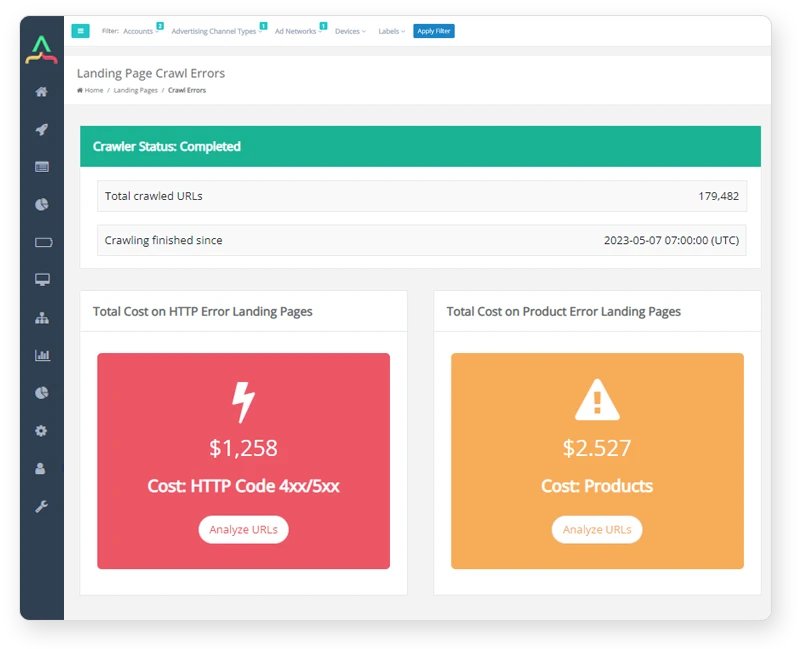
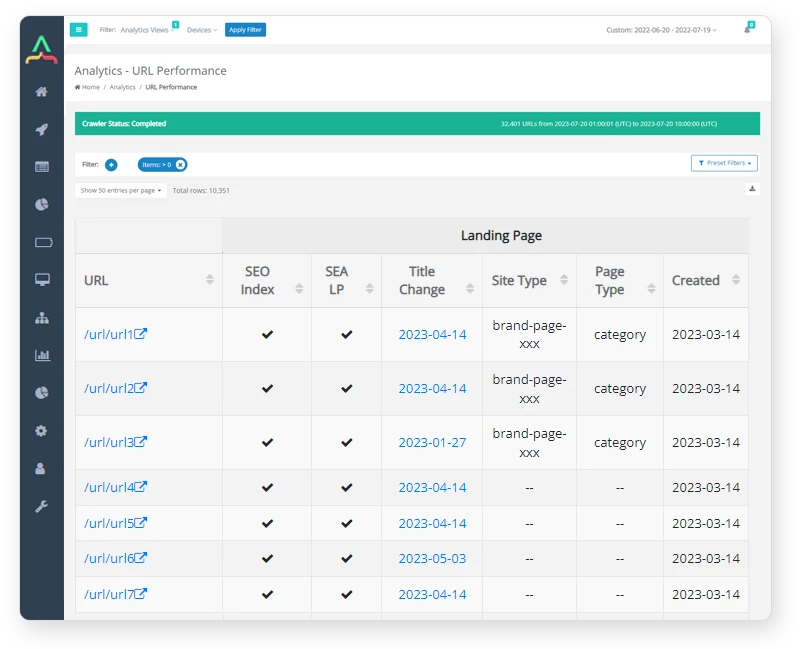
Our automated daily crawler audits the technical health and conversion potential of every landing page in your campaigns. Prevent wasted clicks by identifying 4xx/5xx errors, out-of-stock products, or pages with low product counts before they drain your budget.
- Technical Health: Detect broken links, server errors, and redirects daily.
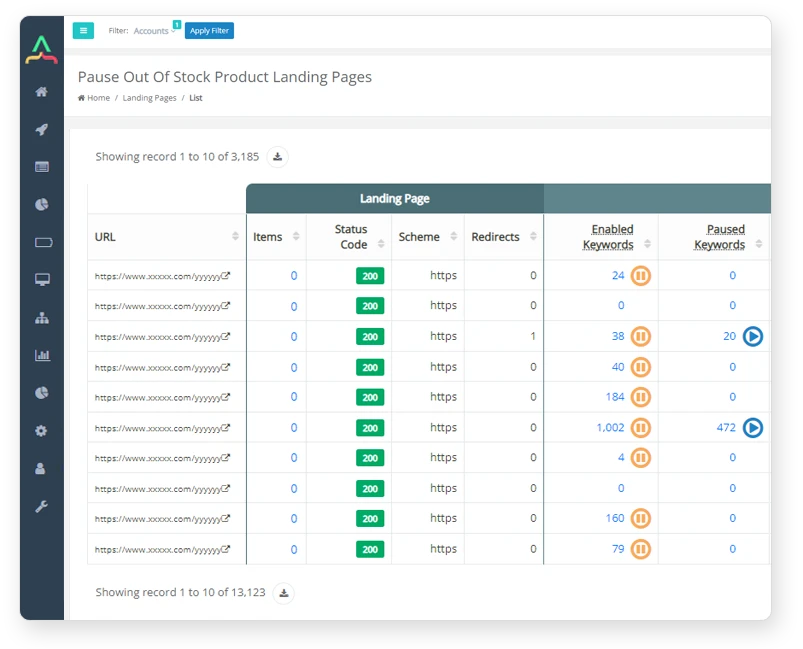
- Product Availability: Automatically identify and get alerts for out-of-stock products on your landing pages.
- Performance Analysis: Rank landing pages by ROAS or conversion rate to find your worst offenders.
- Untapped Potential: Discover high-traffic SEO pages that you aren’t currently using in your paid campaigns.
60+ Daily Automated Audit Checks
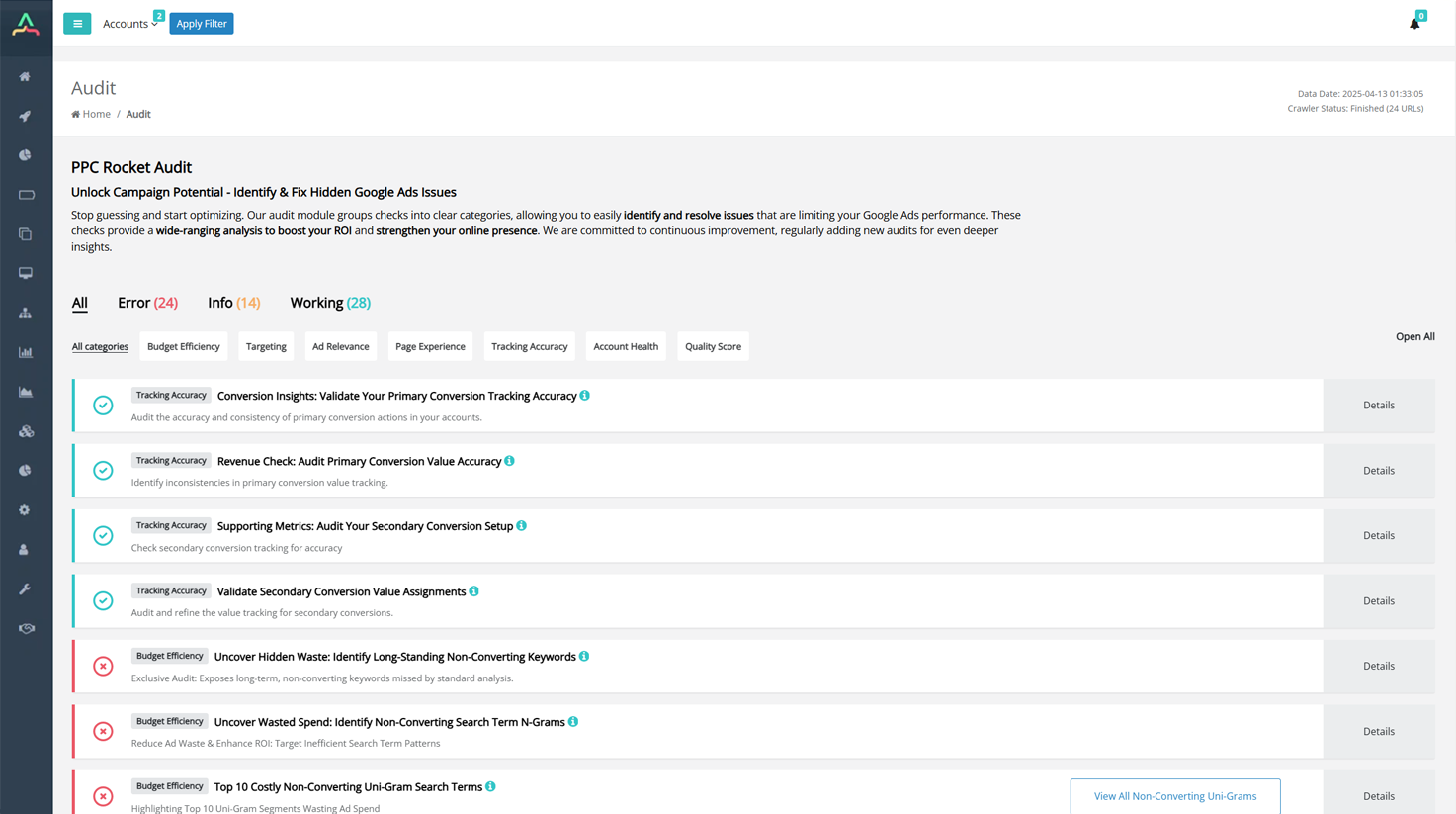
This unique audit, which is impossible in the standard Google Ads interface, identifies long-standing keywords that have consistently failed to convert. It analyzes keywords that existed and had impressions before defined date ranges (e.g., 90, 180, or 365 days), revealing hidden pockets of wasted ad spend. Keywords exhibiting prolonged periods with clicks but no conversions are prime candidates for pausing.
This powerful audit dissects search terms to identify recurring word fragments or patterns (N-grams) that incur costs without driving conversions, such as "free" or "how to". By isolating these non-converting patterns, you can strategically refine keyword targeting and implement negative keywords at the pattern level, which is crucial for reducing inefficiencies caused by broad match types.
This specific analysis ranks the top 10 single-word (Uni-Gram) segments by cost that have failed to drive conversions over the last 365 days. It allows for immediate identification and strategic intervention on the most expensive, non-performing elements within your search terms, helping to optimize budget allocation quickly.
This check analyzes the percentage of time your ads did not appear on the Search Network due to budget limitations (last 30 Days). A high lost impression share means profitable demand exists, but your current budget is limiting visibility, resulting in missed opportunities and lost revenue potential. If performance is strong, this metric is a clear signal for strategic, gradual budget increases.
This check reveals the percentage of auctions where your ads did not appear because your Ad Rank fell below the competitive threshold, even if your budget was sufficient. Ad Rank is driven by bids and Quality Score components. The audit identifies areas with significant Lost IS (Rank) so you can focus on improving ad strength and competitiveness rather than just increasing spend.
This audit analyzes the budget spent on Landing Pages without products. This check is crucial for e-commerce, ensuring that ad spend is not wasted by directing users to pages that are low-content or out of stock, thus maintaining a better user experience and protecting your budget.
This audit checks the accuracy and consistency of primary conversion actions in your accounts. Optimizing toward an irrelevant primary conversion, such as "Page View," means your Smart Bidding is chasing the wrong metrics. This foundational test confirms that your tracking is correctly measuring primary conversions across all accounts.
Inaccurate or missing primary conversion values result in your entire ROAS report being built on false profitability. This check identifies inconsistencies in primary conversion value tracking. It confirms that tracking is active and accurately measuring primary conversion value across all selected accounts.
Secondary conversion actions are intended for observation only and should not influence bidding unless they are part of a custom goal. This check ensures accurate secondary conversion tracking. While useful for identifying assist signals and contextual information, they must be kept separate from primary business goals.
This audit refines the value tracking for secondary conversions. While these values do not impact automated bidding, assigning value based on predictive contribution (like historical lead-to-sale ratios) provides vital strategic context, allowing you to compare lead quality between campaigns. The check confirms that secondary conversion value tracking is operational in all accounts.
Duplicate search queries across multiple Ad Groups or campaigns can cause internal competition, dilute ad effectiveness, and confuse Google's automation. This analysis identifies duplicates over the last 365 Days to help you consolidate them. The recommendation is to review duplicates and select the best-performing combination to route traffic to the optimal path.
This check lists the top 10 duplicate search terms impacting your account, often causing internal competition and increased costs. Reviewing and consolidating these terms is critical for improving campaign efficiency and overall performance.
This check audits Performance Max (PMax) accounts (last 30 Days) for brand impressions, clicks, cost, and conversions. If PMax is capturing significant branded traffic, the strong ROAS may not be incremental growth but rather a redistribution of credit from existing campaigns. Best practice is to exclude brand searches from PMax campaigns to ensure they focus on prospecting and high-intent, non-brand traffic.
This unique audit analyzes landing page performance over the last 30 days based on the number of products featured on each page. The system crawls pages daily to count products and groups metrics by product range. This helps identify the optimal product density for conversion and flags ranges where ROAS drops below 100%, allowing you to optimize landing page design and targeting strategies.
This check surfaces indexed pages that generate high user engagement (sessions) but are currently unused as landing pages in your Google Ads campaigns. These proven pages represent high-potential assets for paid traffic, offering a way to capitalize on existing user engagement and relevance without building new pages from scratch.
This audit identifies your top 10 worst-performing landing pages over the last 30 days, ranking them by their negative impact (Cost - Conversion Value). Underperforming pages drain your budget due to low conversion rates, high CPA, or poor ROAS. The recommendation is to investigate and either optimize these pages or redirect traffic to better alternatives to improve overall ROI.
Our crawlers analyze all your Landing Pages daily to check for Status Code Errors like 4xx or 5xx. Spending budget on broken landing pages wastes ad spend, results in a poor user experience (leading to high bounce rates), and negatively impacts your Quality Score. Identifying these errors allows you to update URLs or fix page issues, ensuring your budget is used effectively.
This daily check ensures all landing pages linked to your campaigns work correctly and do not return 4xx or 5xx HTTP status codes. Such errors indicate problems either on the client side (4xx, like 404 Not Found) or the server side (5xx, like 500 Internal Server Error). Addressing these broken pages is crucial to directing users to functional, high-quality pages.
This check verifies if all your landing pages use the secure HTTPS protocol instead of HTTP. HTTPS encrypts communication, providing an essential layer of security. Furthermore, Google recognizes HTTPS as a ranking signal, and using it builds trust with users since browsers flag HTTP pages as "not secure".
This check identifies newly created or indexed landing pages on your site that may be missing from your paid campaigns. For e-commerce, frequently adding new products or categories requires continuous monitoring. Running paid advertising to these new, relevant pages prevents missed revenue and traffic opportunities, keeping your content fresh and effective.
This audit measures the share of campaign links directed to your homepage. While easy, using a homepage as a primary landing page is usually less effective than tailored landing pages, leading to lower relevance and conversion rates. The recommendation is to use specific pages (product, category, or custom) that align precisely with the user's search intent to ensure better performance.
This analysis identifies the proportion of unique landing pages used in your campaigns. Using the same landing page for all campaigns can negatively impact relevance between the ad and the page, resulting in a poor user experience and high bounce rates. Using unique landing pages per Ad Group or campaign improves relevancy, boosting account performance and conversions.
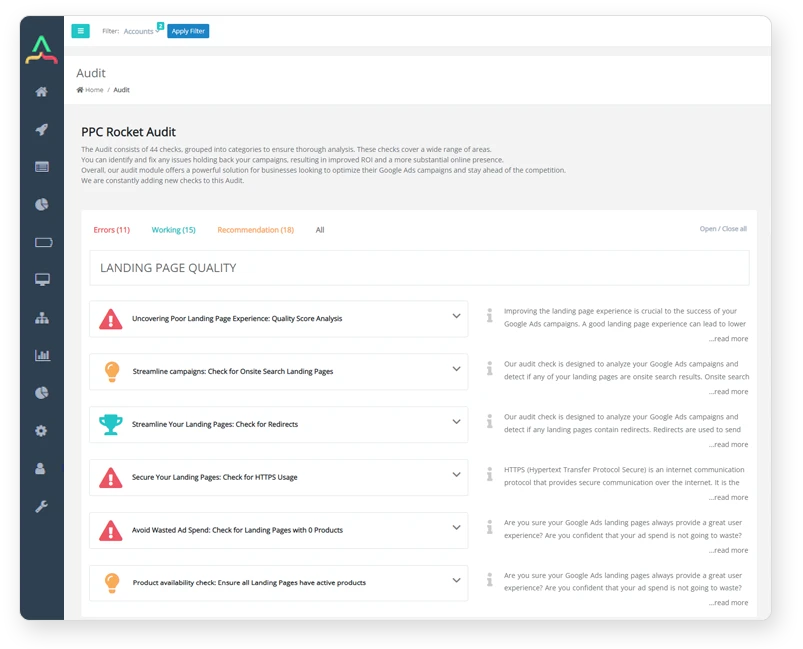
This check analyzes if any of your landing pages contain redirects (like 301 or 302 status codes). Redirects can slow down page loading time, negatively affecting user experience, lowering conversion rates, and potentially impacting search engine rankings. The audit recommends removing unnecessary redirects or updating URLs to the final destination to improve campaign performance.
This audit detects landing pages that are results pages generated by a website's internal search function (onsite search). While using onsite search results can increase relevance for specific keywords, it strongly depends on the search functionality's quality and can lead to a poor user experience. A/B testing between the onsite search page and a standard landing page is highly recommended.
The Domain Analysis identifies the different domains utilized across your Google Ads account(s). Analyzing domain distribution provides insight into your linking strategies. It is crucial to ensure adherence to Google Ads policies, such as the requirement that all ads within a specific Ad Group must use the same domain in their display URLs.
This crucial e-commerce check detects if your landing pages contain active products, which is vital for providing a good user experience and avoiding wasted ad spend on out-of-stock pages. When a landing page lacks active product selections (especially categorized or filtered pages), traffic should be paused, redirected, or the targeting should be changed.
Quality Score (QS) acts as a silent tax or discount, directly affecting your Cost-Per-Click (CPC). This analysis reflects your account's overall QS health by calculating the impression-weighted score across all keywords. Tracking this metric month-over-month helps you diagnose structural issues that translate to rising costs, providing direction for optimization without chasing vanity metrics.
This analysis calculates your saving potential based on Quality Score improvements. It shows the minimum potential cost reduction by improving the Quality Score of all Keywords by just 1 point. This metric offers a quantifiable idea of the maximum budget impact achievable through QS optimization, allowing you to prioritize the optimization of Ad Groups with the highest potential.
This check aggregates the impression-weighted Quality Score of all keywords within your search campaigns to identify Ad Groups with a low aggregated QS (e.g., below 7). While QS is a diagnostic tool and not a KPI, poor Ad Group scores signal a lack of relevance or poor landing page experience, which requires restructuring or optimization.
This analysis reviews all search keywords, including their individual Quality Score factors and the predicted best factor to optimize. A low Quality Score (e.g., below 7) means your ad and landing page are less relevant to the search query compared to competitors, leading to higher CPCs. The diagnosis guides you on whether to improve Expected CTR, Ad Relevance, or Landing Page Experience first.
Quality Score is based on three components: Expected CTR, Ad Relevance, and Landing Page Experience. This impression-weighted check pinpoints the specific component that is consistently the weakest link in your account. By focusing optimization efforts on that single weakest area—instead of guessing—you achieve maximum efficiency and targeted improvements to Ad Rank and CPCs.
This daily check calculates the similarity of all keywords within an Ad Group. Keywords in an Ad Group should be highly relevant and focus on one central theme to ensure congruence between the Ad, the Keywords, and the Landing Page. A low similarity score (e.g., below 70%) can indicate a poorly structured Ad Group, potentially leading to a low Quality Score and a bad customer experience.
The Landing Page Experience (LPE) is a key Quality Score metric used to determine relevance and user experience. A below-average LPE score suggests issues like slow loading speed, lack of relevance to the search query, or unclear Calls to Action. Improving LPE is essential, as a good QS helps lower costs, increase ad visibility, and improve conversion rates.
This check highlights ads and Ad Groups that are not approved due to policy violations, such as prohibited or misleading content. Ads with a "Disapproved" status cannot run, leading to missed opportunities and decreased performance. Regularly monitoring and addressing these policy violations is crucial for smooth campaign operation.
This audit provides insight into the number of ads and Ad Groups affected by various policy review statuses, including "under review," "reviewed," and "under appeal". Understanding these statuses ensures that your ads are in compliance with Google Ads policies and are running smoothly, despite ongoing background reviews.
This check verifies the presence of at least one active ad in all active Ad Groups. If an Ad Group lacks an active ad, it cannot be served to potential customers, resulting in zero impressions, clicks, leads, or sales. Having multiple active ads also allows for testing different variations and helping to spread ad spend, reducing cost-per-click.
This check analyzes if active Image Ad Groups contain at least one active ad. Image Ad Groups, typically run on the Display Network, require active ads to be eligible for placement, maximizing reach and campaign performance. Inactive ads can negatively impact campaign performance, resulting in fewer conversions.
Standard Text Ads are no longer supported on Search or Display Networks, although existing ones may still run. This audit identifies active Ad Groups still running deprecated Text Ads. Google strongly recommends updating these older formats to Responsive Search Ads (RSAs), which automatically adapt to improve reach and relevance.
As of June 30, 2022, Expanded Text Ads (ETAs) can no longer be created or edited, although existing ones continue to serve. This check ensures active Ad Groups are moving away from ETAs, as Google encourages transitioning to Responsive Search Ads (RSAs) for optimal, machine-learning-driven performance.
Responsive Search Ads (RSAs) are crucial because they adapt to show more relevant messages by testing multiple headline and description combinations. Having at least one active RSA in every active Ad Group is essential for maximizing ad variation, improving ad performance through machine learning, and boosting overall efficiency.
This check promotes the use of Responsive Display Ads (RDAs) in Display Ad Groups. By uploading assets, Google's machine learning optimizes the combination of images, headlines, and descriptions for each ad slot. RDAs provide broader reach and efficient campaign management while maintaining control over creative elements.
Expanded Dynamic Search Ads (DSAs) dynamically generate ads based on user search queries and relevant landing pages, which is powerful for capturing a wider audience. This audit ensures that all active Expanded Dynamic Search Ad Groups contain at least one active Expanded Dynamic Search Ad, confirming the foundational structure is in place to allow Google to target product categories or specific pages effectively.
This check analyzes if any ads were automatically added to your campaign by Google Ads. While automation can improve performance, it is vital to review the content and strategy of these system-generated ads to ensure they align with your overall business and advertising objectives. Regular checking ensures you maintain control over your ad management strategy.
Expanded Text Ads allow for an optional third headline, which provides additional space (30 characters) to convey your message to potential customers. This check monitors if you have missed including this third headline in your eligible ads. Utilizing the third headline can help grab attention and significantly improve the effectiveness of your ad campaign.
This audit identifies ads that are missing the optional second description field, available for Text Ads, Expanded Text Ads, Call Ads, and Expanded Dynamic Search Ads. Utilizing this additional field provides more space to convey information, which can greatly enhance the relevance and performance of the ad.
The "Paths" are descriptive segments of your display URL in ad types like RSAs and ETAs. This check identifies ads with empty path fields. Setting the path fields provides potential customers with a clear expectation of the landing page content, which helps build trust and increases the likelihood of a successful click.
This check evaluates whether eligible ad descriptions utilize their full character length. Maximizing the description field allows advertisers to communicate their message clearly, include crucial information like benefits and calls to action, and generally increases the chances of attracting potential customers, thereby maximizing the impact of the ad.
Headline Pinning dictates which headline appears in a specific position of a Responsive Search Ad (RSA), ensuring crucial messages or disclaimers are always visible. However, pinning limits Google's ability to test combinations and automatically optimize performance, which may reduce ad flexibility and result in missed opportunities. This check identifies RSAs where pinning is not utilized.
Similar to headline pinning, Description Pinning allows you to control the visibility and order of specific ad descriptions in an RSA, which is useful for emphasizing important information or avoiding repetition. Yet, this feature restricts the machine learning optimization and increases the need for manual intervention. This check audits the use of description pinning in eligible RSAs.
The Audience Insertion function customizes ad messages based on the viewer's audience segment (e.g., first-time versus returning visitors), which significantly increases ad relevance and engagement. This audit checks if eligible ad types (Text, Expanded Text, Expanded Dynamic Search Ads) utilize this personalization function to create more targeted and effective messages.
The Device function allows you to tailor ad messages specifically for the device being used (mobile, desktop, tablet), such as highlighting a mobile-optimized call-to-action. This customization ensures ads are optimized for each platform, driving better campaign results. This audit checks if eligible ad types use this personalization tool.
The Countdown function inserts a dynamic timer into ad text, creating a powerful sense of urgency for special offers or events. This motivates customers to take action and ensures the ad remains relevant as the event approaches. This check reports on the utilization of this conversion-boosting feature in eligible search ad types.
Keyword Insertion (KI) automatically updates ad text with the exact keyword that triggered the ad, dramatically increasing ad relevance to the user's search query. This personalization saves time by eliminating the need to create unique ads for every keyword while effectively boosting relevance and click-through rates. This audit reports on KI usage across eligible ad types.
Location insertion tailors ad text to include the customer's physical location or location of interest (e.g., "Las Vegas Hotels"). This geographical personalization increases ad relevance, making the ad copy more specific to the user's immediate needs. This check verifies if eligible search ad types are using this relevance feature.
Call Ads target customers who are ready to engage in a conversation. This check highlights the absence of Call Ads in accounts where driving calls may be a priority. Optimizing Call Ads involves setting compelling ad text, scheduling them for times when staff are available, and tracking calls as conversions to maximize efficiency.
This check ensures that all active Accounts running Search Campaigns contain at least one active Keyword. Keywords are the fundamental trigger for ads, and selecting high-quality, relevant keywords is essential for reaching the most interested customers.
This audit verifies that all active Search Campaigns contain at least one active keyword. Campaigns are the organizational backbone where budget and delivery options are set, and without active keywords, campaigns are effectively inert, wasting organizational effort.
This check confirms that all active Search Ad Groups contain at least one active keyword. Ad Groups organize related keywords and ads for specific targeting and testing. A missing keyword means the Ad Group cannot perform its function.
Negative keywords exclude irrelevant search terms, which is crucial for improving targeting and increasing Return on Investment (ROI). Accounts lacking negative keywords risk showing ads for unrelated queries, draining budget, and lowering Quality Score.
This audit identifies active Search Campaigns lacking negative keywords. Adding negative keywords to campaigns helps focus on high-value terms, excluding traffic that is less likely to convert, thereby maximizing ROI.
This check flags active Ad Groups that do not contain negative keywords. Implementing granular negative keywords at the Ad Group level is essential for refining relevance and directing ads only to users searching for specific, valuable queries.
Having too many keywords in a single Ad Group (recommended maximum is typically below 20) makes it difficult for Google Ads to determine the best ad to show, potentially leading to irrelevant ad delivery. Limiting keyword count ensures ads are more targeted and relevant, resulting in higher click-through rates, lower CPCs, and improved conversion rates.
This check provides a comprehensive analysis of the sheer volume of active structural elements in your account(s). It details the number of active Campaigns, Ad Groups, Keywords, Negative Keywords, and Ads. This overview is vital for understanding the overall complexity and structure of the account.
This analysis gives insight into the usage of various active campaign types (e.g., Search, Display, Video, Multi-channel) across your account. Running tests with different types is essential for maximizing performance, as each has unique features, targeting, and metrics. Staying updated and adapting campaign types is crucial to keep pace with market and algorithm changes.
This audit details the number of active Campaign Sub-Types (e.g., App Campaign, Smart Shopping, Video TrueView) in use. Testing different sub-types is necessary for identifying potential uplifts in performance, as new options are constantly being introduced and old ones deprecated.
This comprehensive analysis reviews over 35 different ad types in use (Text, Image, Video, Responsive, etc.) across active Ad Groups. It helps understand the overall ad format utilization and, critically, identifies if deprecated ad types are still running, which should be updated to prevent potential performance issues.
PPC Rocket Modules Included in Your Audit
Google Ads Audit Tool
Daily audits assess the performance of your PPC account(s) using 60+ automated tests to measure critical KPIs and best practices. Automate your Google Audit Process for efficiency and gain clear, actionable recommendations to optimize your ad performance.
More Details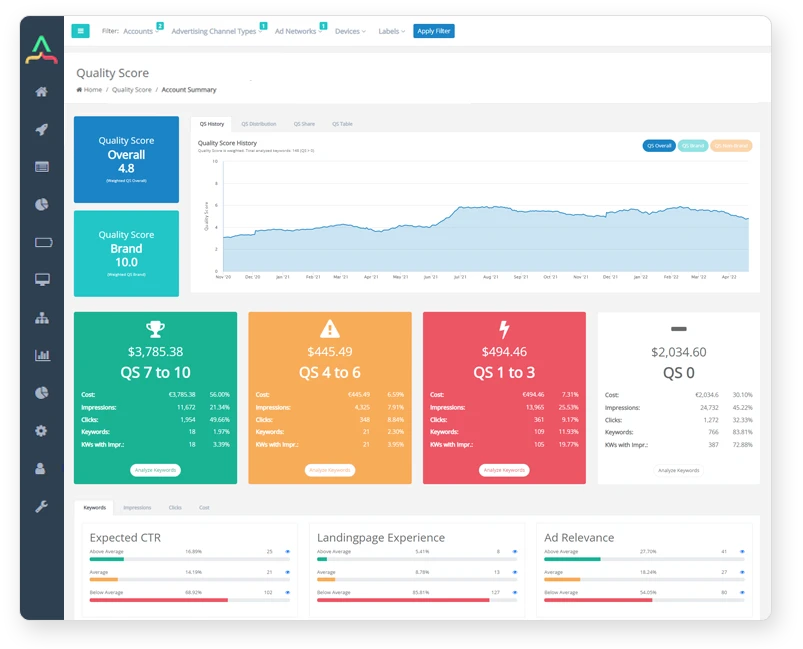
Google Quality Score Tool
Ensure your Account(s) are optimized for the Google Quality Score. Directly see the min. and max. cost-saving potential and gain a deeper understanding of how QS Metrics like CTR, ad relevance, and the landing page experience impact your ads.
More Details
Google N-Gram Tool
Unlock deep insights into search behavior with our N-Gram Analyzer, transforming search queries into Uni, Bi, Tri, and Four Grams. Define your preferred date range to run the N-Gram Report and set negatives with a single click.
More Details
Not Converting Keywords Tool
The module performs a daily analysis of keywords that haven't produced any conversions within specific time intervals (e.g. 90 days, 180 days, and 365 days), focusing only on keywords that were in existence before these time periods.
More Details
Landing Page Crawler
PPC Rocket automatically assesses the technical health of your landing pages, from 4xx & 5xx status codes, page availability, redirects, and page speed to overall keyword relevancy.
More Details
Landing Page Insights
Determine landing page performance with detailed breakdowns of marketing ratios & cr, cost vs. conversion, keywords linking to a page, and estimated costs for unreachable pages in your campaigns.
More Details
E-Commerce Tool
Daily analysis of your Google Ads landing pages, with customizable crawl rates, includes automatic labeling as "PPC Rocket X Stock" for pages meeting specific criteria, such as low or no product content.
More Details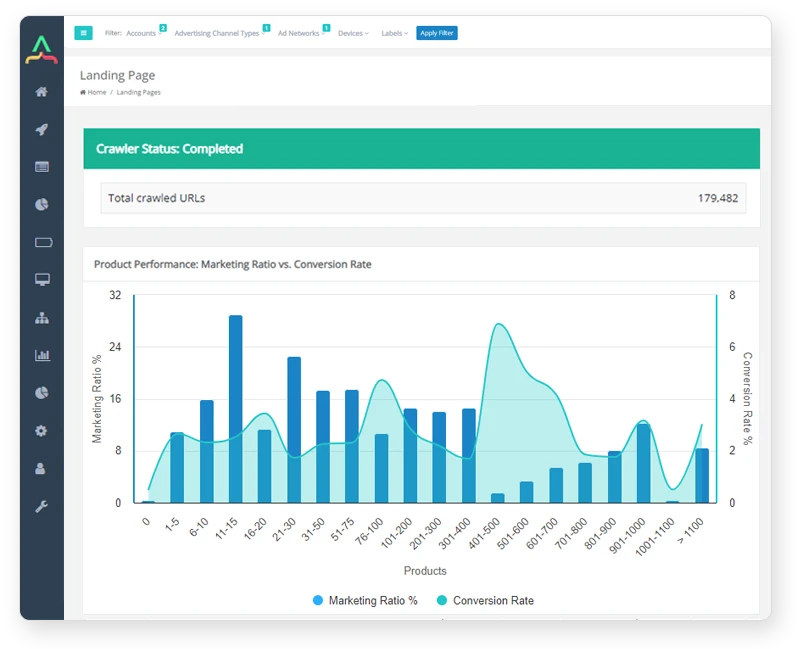
Product Analyzer
The dashboard displays landing page performance in relation to product quantity, helping you decide whether it's worthwhile to advertise pages with only a few products. We crawl all pages daily to provide accurate data.
More Details
Performance Analyzer
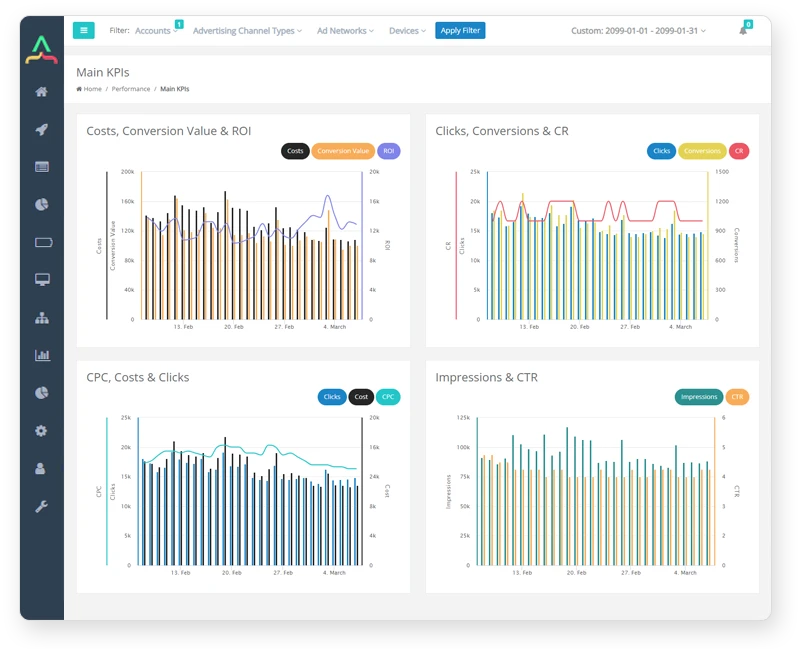
Identify Google Ads performance issues instantly so you can improve cr and other performance metrics. Predefined filters let you slice through the data, giving you critical insights into performance.
More Details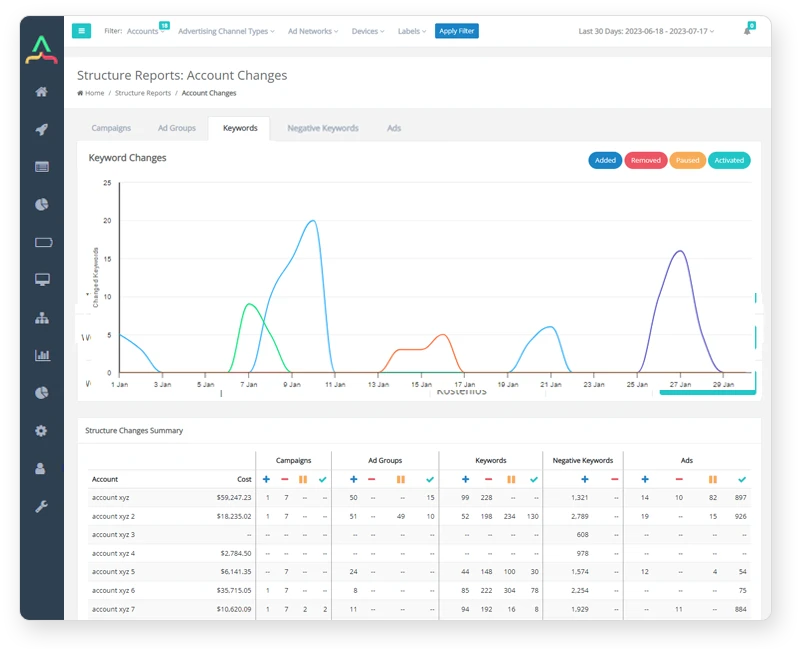
Account Activity
Create activity reports with changes in the structure of your Accounts, Campaigns, Ad groups, Keywords, Negative Keywords, and Ads. Quickly see how many structure changes in your accounts are done by yourself, Freelancers, or Agency.
More Details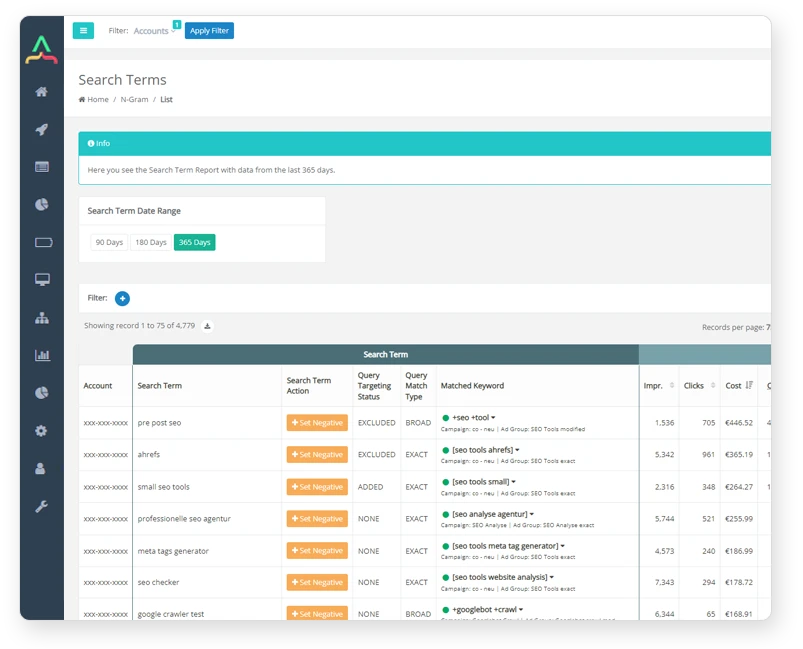
Google Search Term Analyzer
The search query analyzer performs daily evaluations of search queries. It offers valuable insights into query performance to enhance your advertising efforts.
More Details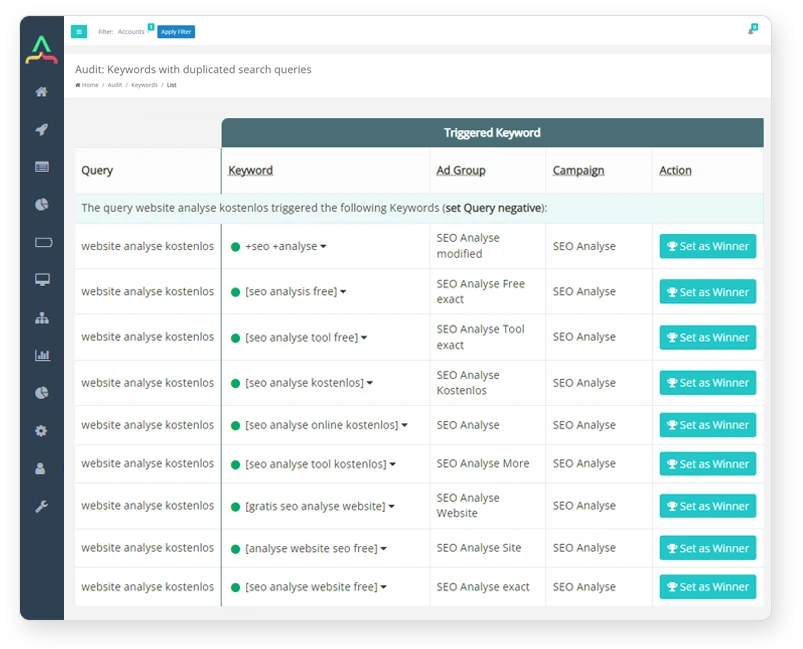
Duplicate Search Terms Tool
Duplicate queries or search terms across multiple Ad Groups can be a problem for advertisers. Easily identify and fix them with PPC Rocket and profit from increased ad effectiveness and higher ROI.
More DetailsYour Actionable Audit in 5 Minutes
Connect your Google Ads account securely in under five minutes. Our platform begins analyzing your data immediately, and your first comprehensive audit will be ready within 24 hours. No credit card required!
Find Wasted Spend Instantly
Our audit exposes hidden budget leaks that standard analysis misses. Identify long-standing non-converting keywords, costly N-Gram patterns, and landing pages that drain your budget without delivering ROI. On average, we find around 15% of budgets are being wasted.
Automate Manual Work
Replace hours of manual spreadsheet analysis with daily, automated checks. Get clear, prioritized recommendations on everything from Quality Score optimization to Impression Share limitations, so you can focus your time on high-impact strategic decisions.
Make Data-Driven Decisions
Gain deep insights into your account's true performance. Track historical activity to see the impact of changes made by your team or agency, diagnose underperformance with impression-weighted Quality Score trends, and find untapped opportunities in your best-performing SEO pages.

Reviews
Based on 40+ reviews

David Chen
Head of E-commerce

The landing page audit alone is worth it. It flagged two high-spend campaigns sending traffic to pages with zero stock. That was an instant €800/month saving. The tool also showed our pages with 11-15 products had a 198% ROAS, while pages with under 10 products were unprofitable. We're now rebuilding our ad group structure based on that data.
Maria Garcia
Marketing Director
I use the Account Activity report to get a clear, unbiased view of what our agency is actually doing. Two weeks ago, I saw a massive spike in structural changes that preceded a dip in performance. The audit gave me the specific data I needed to have a productive conversation with them about their strategy. It’s the ultimate accountability tool.
Ben C.
Senior PPC Consultant
In big accounts, waste hides in plain sight. The N-Gram audit surfaced that the single word 'reviews' appeared in hundreds of non-converting search terms, costing one client over €2,000 in three months. Google's interface would never show me that pattern. This tool does, and I can add it as a negative with one click. It’s pure efficiency.
Martin H.
Digital Marketing Analyst
I signed up purely to validate my own manual audits. On day one, the Duplicate Search Term tool found the same high-cost query triggering ads in three different ad groups, causing internal bid competition. Consolidating that alone lowered our CPA for that term by 18%. The data is clean, the insights are actionable, and it finds things I would have missed.
Anja S.
Founder
I don’t have time to live inside Google Ads. I needed a simple red-flag system. The audit showed my Impression Share Lost to Rank was over 60% on my best campaign. It wasn't a budget issue; my ads just weren't competitive enough. I spent an hour rewriting ad copy based on the recommendations and my impression share doubled the following week.

4.7 Star (104 ratings)
Customer rating
Stop Guessing. Start Optimizing.
Your campaigns are leaking money. Our audit tool delivers the clarity you need to find and fix it. Get daily, automated insights on 60+ critical checks—from tracking accuracy and PMax brand traffic to duplicate search terms and underperforming landing pages.
Start Your Audit and Find Your Wasted Spend